> For the complete documentation index, see [llms.txt](https://docs.pushsale.vn/llms.txt). Markdown versions of documentation pages are available by appending `.md` to page URLs; this page is available as [Markdown](https://docs.pushsale.vn/huong-dan/10.-app-pushsale/kho-so-tha-noi.md).
# Kho số thả nổi
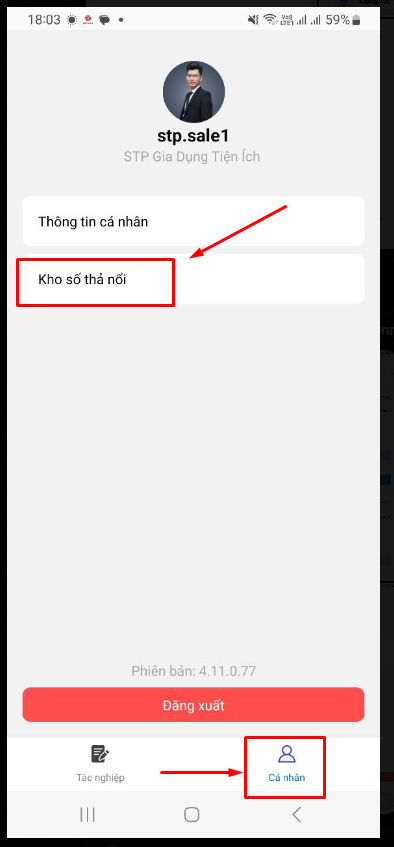
Sử dụng tài khoản Admin/ Sale vào App Pushsale ( Cập nhật từ bản 4.11.0.77)\
Tại giao diện hiển thị chọn **Cá nhân => Kho số thả nổi**
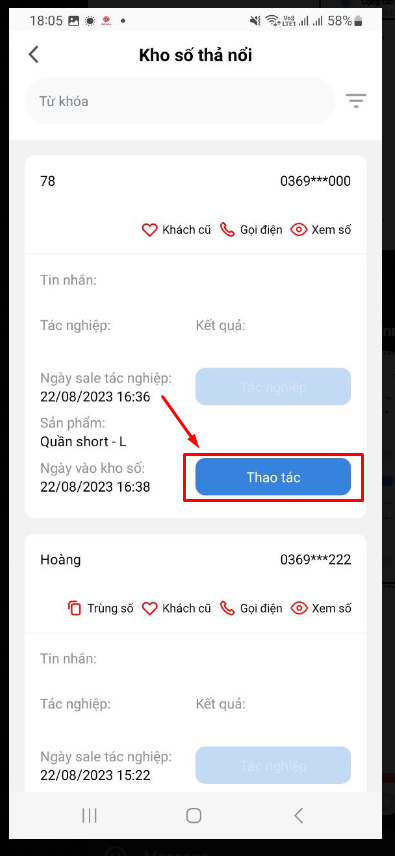
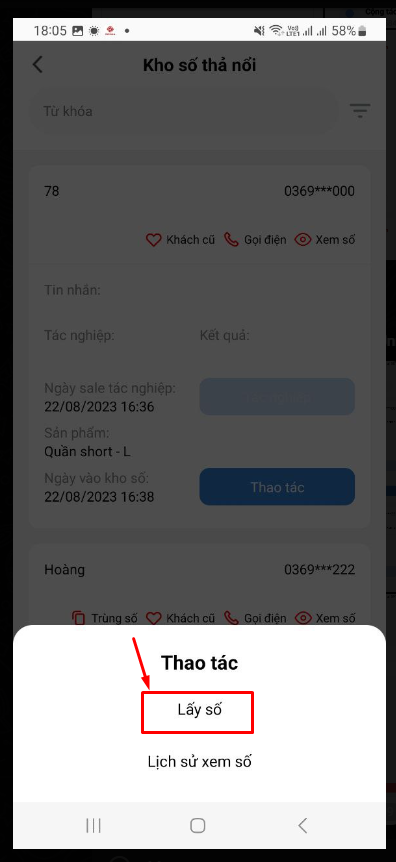
Màn hình hiển thị danh sách Kho số thả nổi => Chọn Thao tác => Chọn Lấy số để gắp số về cho tài khoản của mình
Ngoài ra có thể lựa chọn các tác nghiệp như Web bằng cách bấm vào các icon hiển thị\
\- Trùng số: Xem danh sách đơn cùng số điện thoại\
\- Khách cũ: Xem danh sách lịch sử mua hàng\
\- Gọi điện: Thao tác gọi ra cho khách\
\- Xem số: Xem đầy đủ số điện thoại của khách ( TH bị che số)